EveryExtra LIVE
Event Feedback Surveys, While People Are Still In The Room.
Event feedback surveys ask a few questions at the end of your event, and people answer on the phone already in their hand. Response rates beat an email sent the next day, and the results are ready before you’ve packed up.
Included with business event packages. No app for attendees.
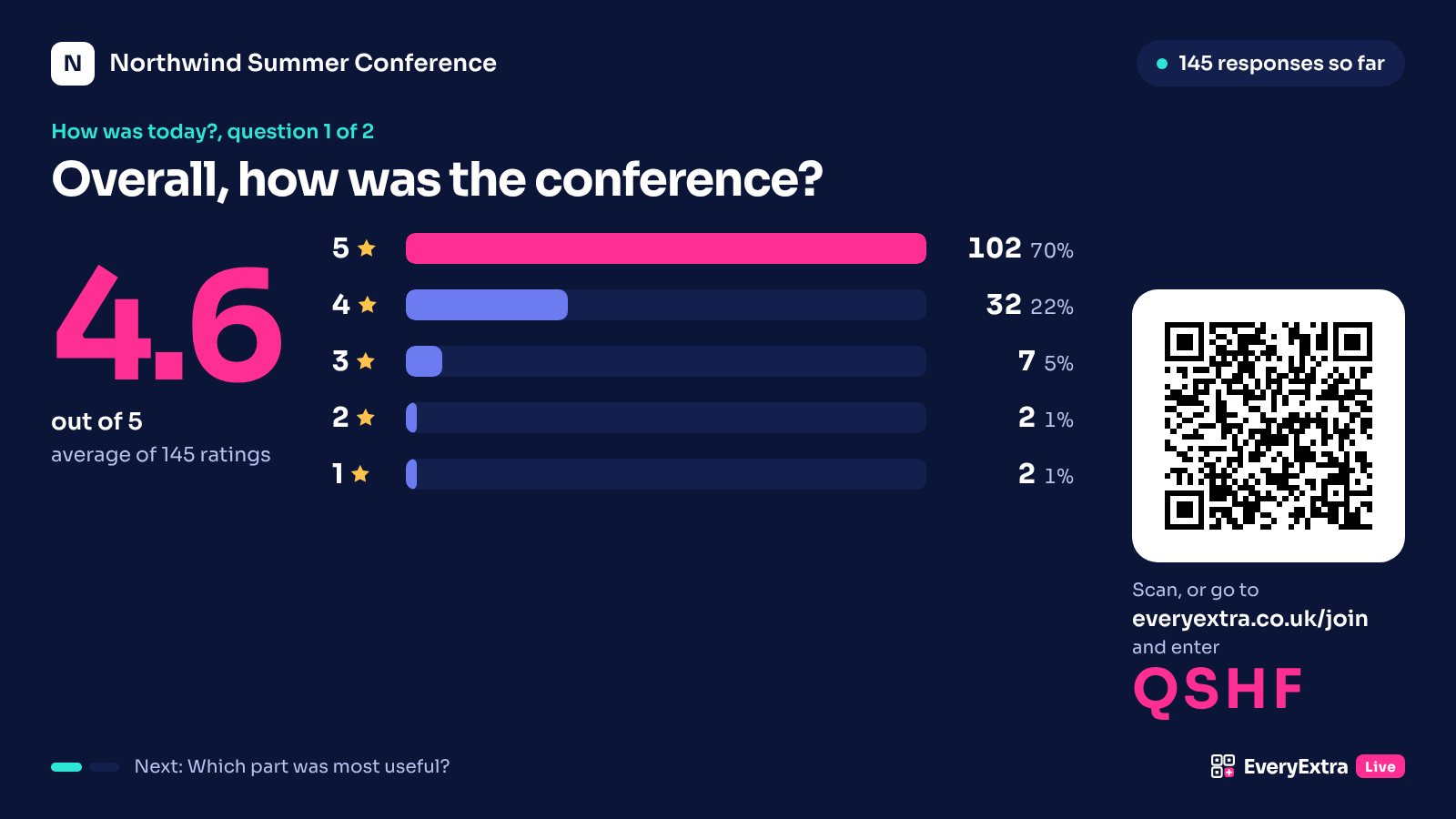
The big screen showing a survey rating: the average and how the ratings split. A real screen from the business demo.
Who Sees What
Attendees
Rate with stars, choose an option or write a few words, at their own pace. Anonymous unless you ask for names.
You
Watch responses arrive, then download the PDF report or the spreadsheet.
The Big Screen
Optional live charts: the average rating and a bar for each answer. Written answers are counted, never shown.
Set It Up In Three Steps
Write A Few Questions
Three to five is plenty. Choose the kind of answer for each.
Open It At The End
Put the code on screen and give people two minutes.
Download The Report
Charts for every question, ready to send to your team or your client.
Your Choices
Three Kinds Of Question
Star ratings, choose one, and written answers.
Anonymous Or Named
Keep answers anonymous for honest feedback, or collect names.
Live Charts If You Want Them
Show results on the big screen as they come in, or keep them to yourself.
A Report To Share
Every chart in a designed PDF, and every answer in a spreadsheet.
Good For
- Conference and training feedback
- Post-event reports for clients and sponsors
- Staff party feedback
- Customer events
Your Questions Answered
Are answers anonymous?
Yes, unless you choose to keep names with answers.
Can we get the raw answers?
Yes. Every response downloads as a spreadsheet, alongside the PDF report with charts.
More Of EveryExtra LIVE
Every activity runs from the same QR code, presenter link and big screen.
Live Q&A
Attendees ask and upvote questions. Your speaker sees the best ones first.
See how it worksLive Polls
Ask the room anything and watch the results build on screen.
See how it worksWord Clouds
One word from everyone becomes a picture of the room.
See how it worksIdeas Board
Collect ideas from everyone, then let the room vote the best to the top.
See how it worksLive Quiz
Timed questions, points for speed and a leaderboard on the big screen.
See how it worksSpin The Wheel
A wheel of names, prizes or outcomes that spins on the big screen and every phone.
See how it worksAwards
Present every award on the big screen, with each winner on everyone’s phone.
See how it worksAll Of EveryExtra LIVE
How every activity, the presenter link and the big screen work together.
See the overviewWhy Ask In The Room
A feedback email sent the next day gets a handful of replies, mostly from the people who loved it or hated it. Ask the same questions while people are still in the room, on the phone already in their hand, and you hear from far more of them. The answers are fresher too: people remember the session they just sat through, not a blur of the whole day.
Good Survey Questions
- How useful did you find today? A star rating
- Which session was most valuable to you? Choose one
- How likely are you to come back next year? A star rating
- What one thing would you change? A written answer
- Would you like us to contact you about anything? Choose one
Three to five questions is plenty. Put the most important first, in case people stop early.
Timing It Right
Open the survey during the final session, not after it. Put the code on the big screen, give people two minutes and say thank you while they answer. If you leave it until people are reaching for their coats, they won’t do it. For multi-day events, a short survey at the end of each day works better than one long one at the end.
Setting Up The Big Screen
You don’t need special equipment. Open the big-screen link in any web browser on the laptop connected to the venue’s screen or projector, and press full screen. Your presenter uses their own private link on a laptop, tablet or phone, and the big screen follows them. Test both at the venue before people arrive, on the venue’s own wifi, and keep the laptop plugged into the mains.
Attendees join with the same QR code as your event’s photo gallery, so there’s only ever one code to show. Put it on the screen, on the tables and in the programme, and people can join in at any point in the day.
One Code, Every Activity
Every EveryExtra LIVE activity runs from the same QR code, the same presenter link and the same big screen. Open a word cloud to start the day, a Q&A for each talk, a poll or two in the afternoon, a quiz after dinner and a survey to close, and attendees never need to scan anything new. Everything they do sits on the Live tab of your event, beside the photo gallery, so people who are sharing photos are already one tap away from joining in.
Prepare as many activities as you like before the day and open each one at the right moment, or set times and let them open and close by the clock. Your report keeps every result in one place afterwards.
Included With Business Events
EveryExtra LIVE is our own business clients’ tool. It comes with the business event packages you book with us directly, alongside photo and video sharing, your logo on everything, a live slideshow and attendees’ contact details if you’d like to collect them. There are no per-attendee charges and no app for anyone to download. Ask for a quote and we’ll reply with a price, usually within one working day, or try every activity for yourself in the business demo first.
A Report Ready To Send
When the survey closes, your report has a chart for every question, ready to send to your team, your client or your sponsors. Written answers are in the spreadsheet, and never shown on the big screen, so people can be honest.
More Questions
Can we run more than one survey?
Yes. Add a survey for each day, each session or each part of your event.
Add It To Your Next Event.
Tell us about your event and we’ll reply with a price, usually within one working day. Or try it now in the business demo.