A Printed Wedding Album From Everyone’s Photos, Laid Out For You.
We lay out a printed wedding album from the photos and messages your guests shared, in the order of your day. Change anything you like, look through it free, then download print-ready files made to the exact size your chosen printer needs.
Free to set up · Pay when you go live
What It Does
Laid Out For You
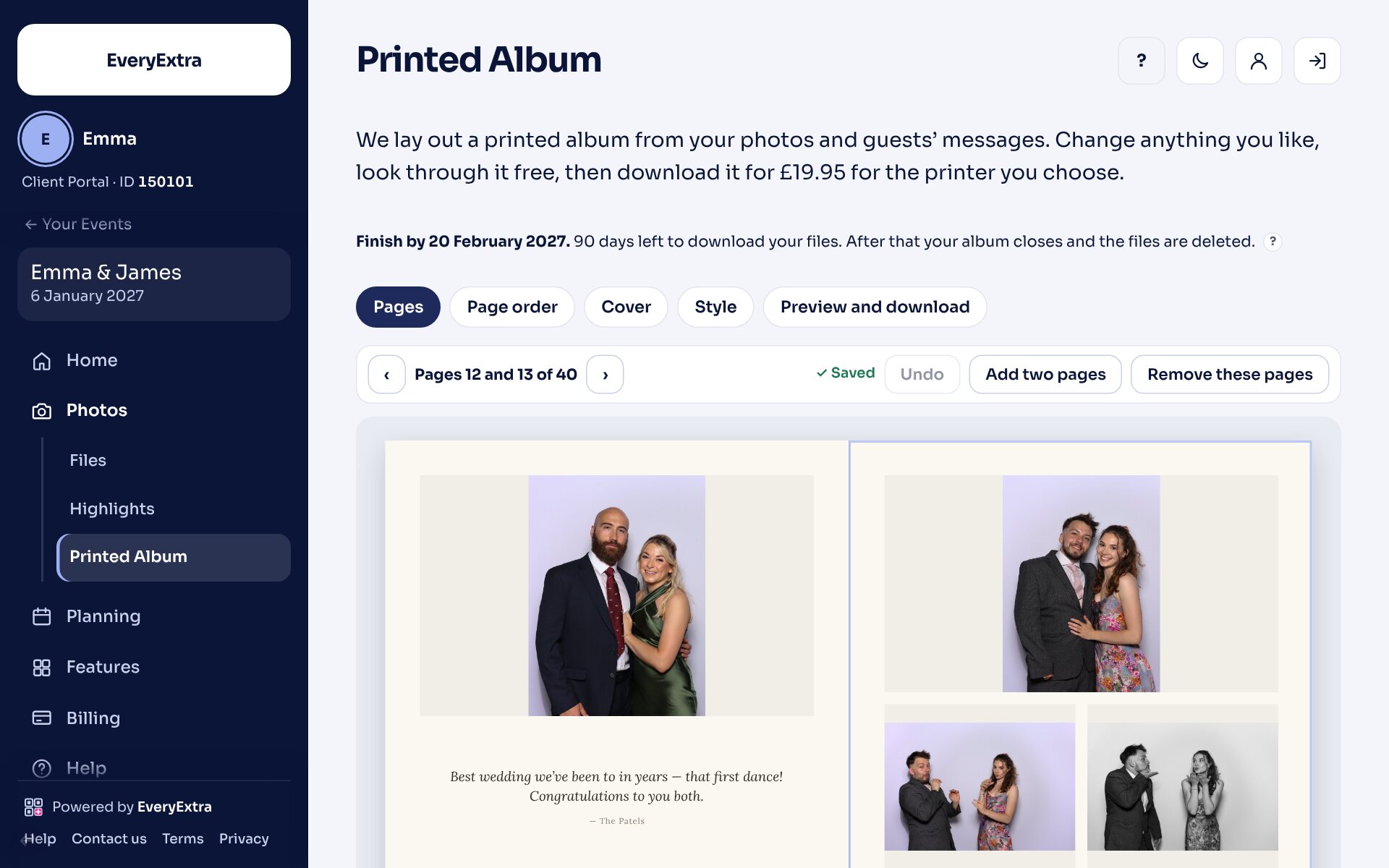
Your album is ready in moments: the day in order, a caption where each part of the day begins, and guests’ messages along the way.
Change Anything
Swap, crop or remove any photo, choose a layout for each page, move pages around and add or take some out.
Your Cover
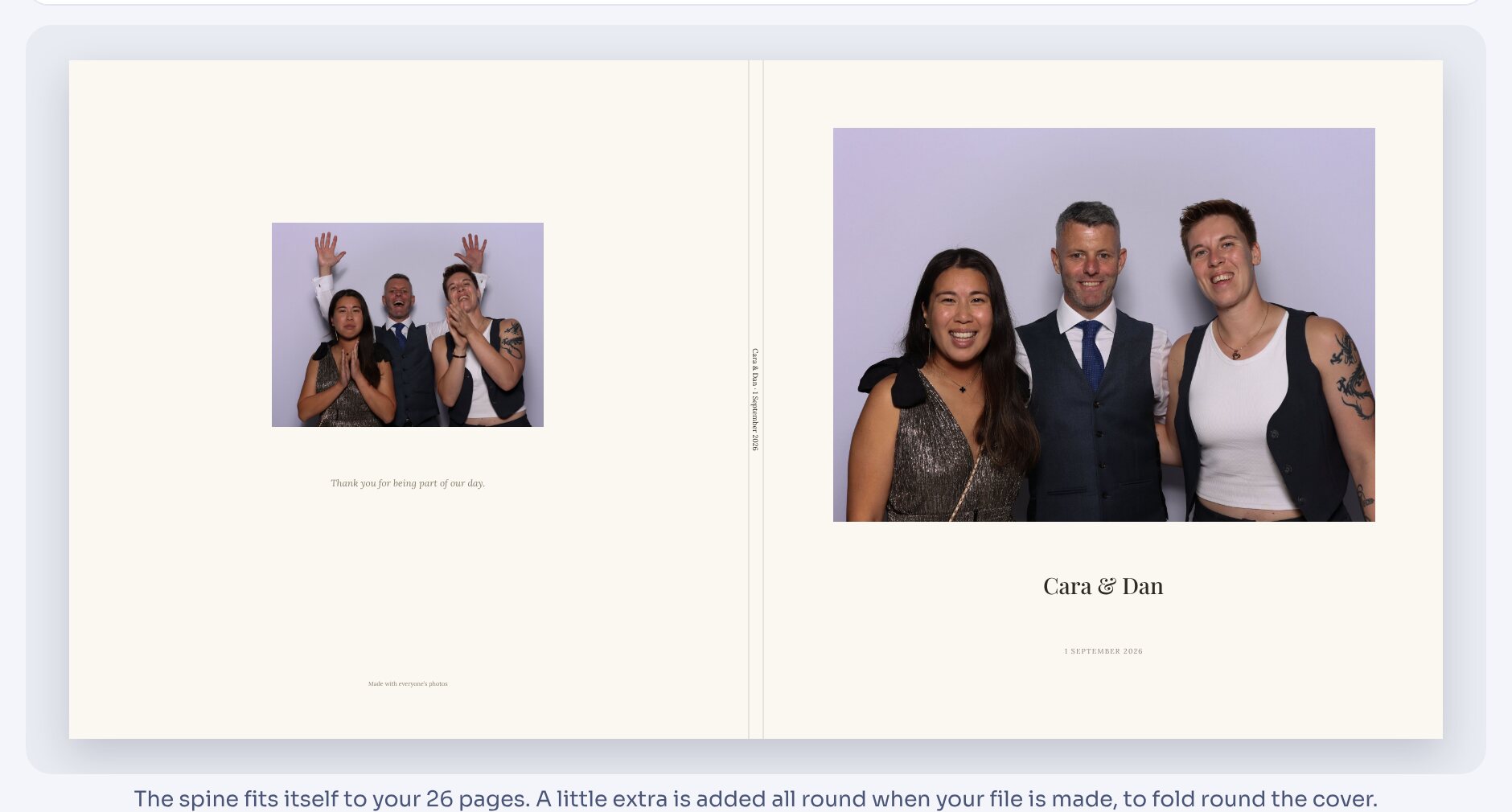
Your names, date and place, a cover photo, a spine that fits your number of pages, and a line on the back.
Four Styles
Classic, Timeless, Modern and Romantic, each with its own fonts, plus a choice of background colours.
Made For Your Printer
Print-ready files for Blurb, CEWE or Mixam, to their exact size. Change printer whenever you like, at no extra cost.
Look Through It Free
See every page before you pay. Pay £19.95 once to download, then make it again as often as you like.
Your Photographer’s Photos
Add your professional photos alongside your guests’, if you have the rights to print them. Only you see them.
Checked Before You Pay
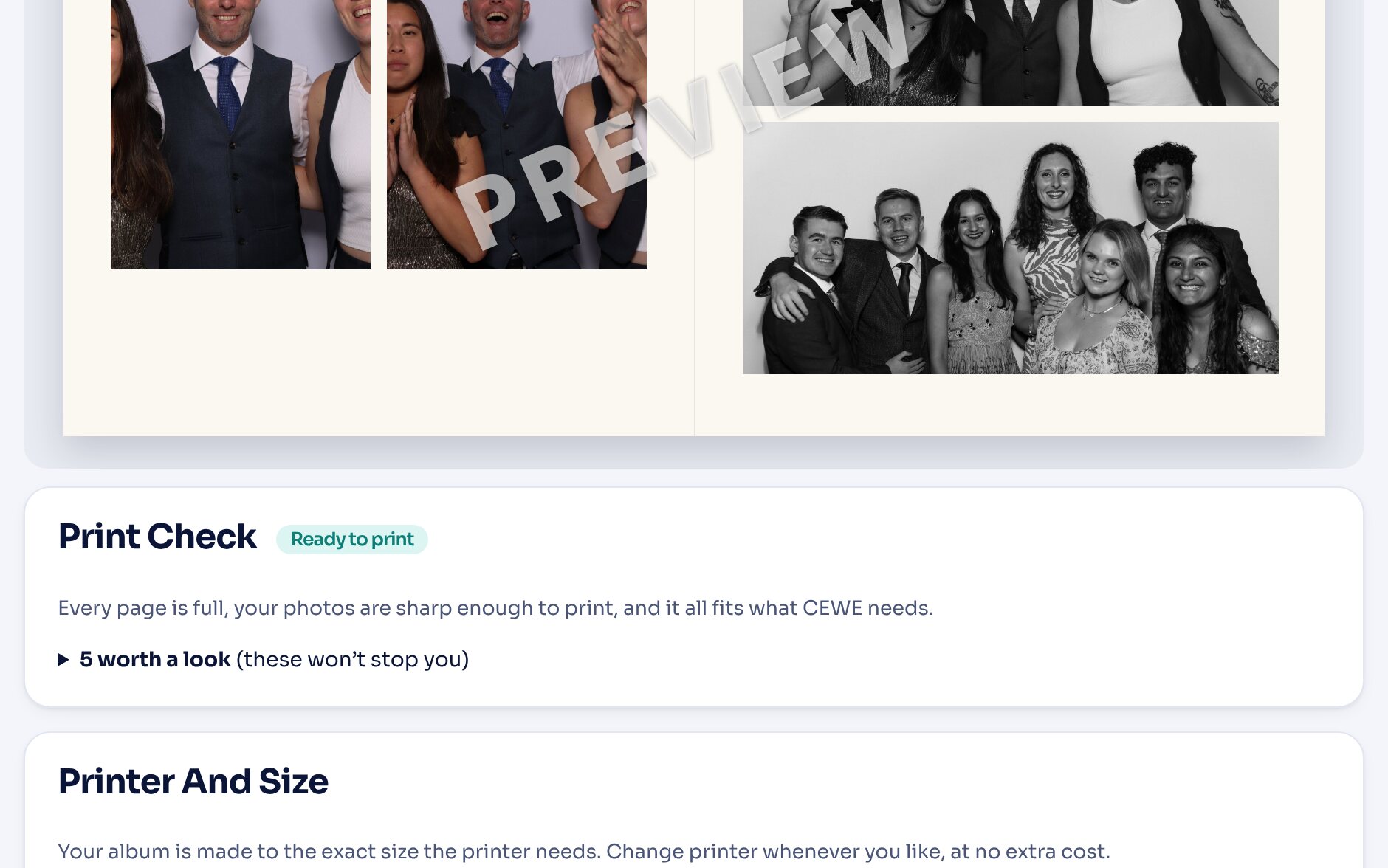
Every page is checked against your printer: no empty spaces, no soft photos, and nothing trimmed off.
How It Looks
Real screens from the Printed Album editor.
The Print Check
Every page checked against your printer before you pay.
Your Photographer’s Photos
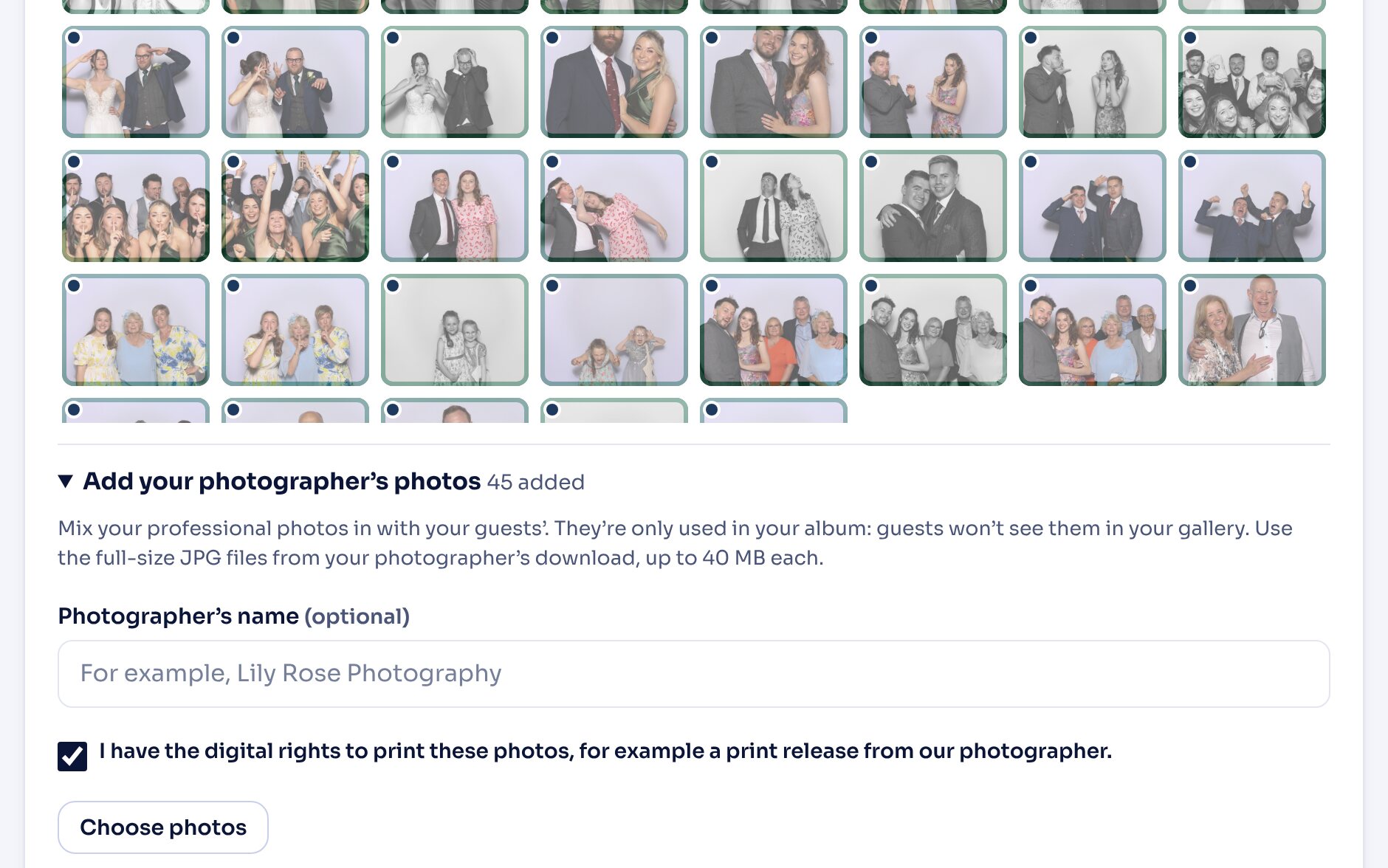
Add them alongside your guests’, only for your album.
Your Cover
Your names, your favourite photo and a spine that fits.
Why A Printed Album
Your photographer’s album shows the day the way they saw it. Your guests saw it differently. They were at the tables, on the dance floor and in the queue for the photo booth, and their photos catch the moments a professional can’t be everywhere for: your nan’s face during the speeches, the cousins’ dance-off, the friends who travelled furthest. A printed album brings both together and tells the whole story.
Most guest photos stay on phones and in a gallery that gets looked at for a week. Putting the best of them in a book means they get picked up again, at anniversaries and at Christmas, by people who weren’t there and by the guests who took them.
What You Get For £19.95
One payment, on every package, for the whole service:
- A first version laid out for you from your guests’ photos and messages, in the order of your day.
- An editor where you can change every part of it: photos, layouts, words, page order, style and cover.
- Your photographer’s photos alongside your guests’, if you have the rights to print them.
- A print check on every page before you pay, so nothing prints soft, blank or trimmed off.
- Two print-ready files, the pages and the cover, made to the exact size, bleed and spine your printer needs.
- Changes after you’ve paid, new files whenever you like, and a different printer or size at no extra cost.
Starting is free, and so is looking through every page. You only pay when you’re happy and want the files. The printing itself is paid to the printer, at their own prices, and you can order as many copies as you like.
From the day you start, you have 90 days to finish your album and download your files. Your album page always shows the date, and we email you two weeks before. After 90 days the album closes and its files are deleted, so keep your downloaded files safe: they’re yours to order from as often as you like.
How Your First Version Is Made
When you start, we lay out a first version from everything your guests have shared. Photos go in the order of your day, using the parts of the day your event already has, with a caption where each part begins, such as the ceremony, the speeches or the evening. Near-identical shots from a burst are left out, and the photos guests liked most are chosen for the title page and the cover.
Guest messages go in along the way, some beside a photo and some on a page of their own, with the guest’s name underneath. The first page is a title page with your names and date, and the last page carries a thank-you line. With plenty of photos the album starts at about 40 pages, and with fewer it starts smaller, so pages aren’t left empty. If a photo would print too soft in a big space, it’s given a smaller one. It takes a few moments, and nothing is final: everything can be changed.
Making It Yours
Everything happens on one page, and it saves as you go:
- Tap a photo to swap it, crop it, zoom in, show it whole or remove it.
- Drag photos from Your Photos onto any page, or tap a space and then a photo.
- Choose a layout for each page: one big photo, two side by side, a grid of photos, a photo with a message, or a full page that runs to the edge.
- Write a caption on any page, or a few words on a page of their own.
- Drag pages into a different order, add pages, or take some out. Put them back in time order with one button.
- Undo anything you didn’t mean to do.
Your Photos shows every photo you can print, with a green edge on the ones already in your album, and you can show only the ones not used yet or the photos from one part of the day.
Add Your Photographer’s Photos
Your guests caught the candid moments. Your photographer caught the portraits, the ceremony and the first dance. Add their photos to your album and you have the whole day in one book.
Open Add your photographer’s photos under Your Photos, add their name if you’d like, and choose the full-size JPG files from their download. They appear in Your Photos under From your photographer, ready to drag onto any page. They’re only used in your album: guests don’t see them in your gallery, slideshow or anywhere else.
Only add photos you have the rights to print. Most wedding photographers give a print release with your download, which lets you print your photos for your own use. You tick a box to confirm you have it before you add any. If you’re not sure, ask your photographer: it’s usually a quick yes.
The Print Check
Before you pay, we check your whole album against what your chosen printer needs, page by page, and tell you in plain words if anything would spoil the print:
- Every space for a photo is filled, and no page is left blank.
- Every photo has enough detail for the size it’s printed at. If one would look soft, we tell you which page, so you can use it smaller, zoom out or choose another.
- Words are clear of the edges, so nothing is trimmed off when the book is cut.
- Your number of pages suits your printer. CEWE, for example, adds pages four at a time.
Tap anything in the list and you go straight to that page to put it right. Things that would spoil the print must be put right before you can download. Smaller things, like a photo that’s fine but would be sharper a little smaller, are shown too, but never stop you.
Your Cover And Title Page
Choose a layout for your front cover: Framed, with a photo and your names beneath it; Soft edges, where the photo fades gently into the page; Full page, where the photo runs to the edge; Names only; or a Collage of four photos. Resize the photo space and drag your names anywhere you like. Turn down the photo’s strength so your names stand out over it, and choose a colour for the words: the style’s own, white, black, navy, gold, blush or sage. Page 1 of your album has the same choices, and a reset button puts either one back as it was. Add your names, date and the place, choose what goes on the spine, and write a short line for the back.
The spine fits itself to your number of pages, and a little extra is added all round when your file is made, so the cover folds neatly round the board. If your printer shows a slightly different cover size for your order, type it in on your download page and we make your cover again, at no extra cost.
Styles And Colours
Four styles set the fonts for your whole album. Classic pairs an elegant serif title with italic captions. Timeless uses a traditional book typeface. Modern is clean and simple. Romantic uses a flowing script for your names. Choose the style’s own background or white, cream, blush, sage or charcoal, and slimmer margins if you’d like bigger photos.
Print-Ready For Your Printer
Blurb, CEWE and Mixam each take a book you’ve made yourself as a PDF, and each needs a slightly different size. Choose your printer and size, and we make two files to their measurements: the pages, with the extra edge printers trim away, and the cover. Photos go in at the full resolution they were shared, and the fonts go in with them, so what you see is what prints.
Your download page shows the steps for your printer: open their site, choose the same size and number of pages, upload both files and order. They print your books and deliver them to you. Change your album and make the files again as often as you like, or make them for a different printer, at no extra cost.
Set It Up In Four Steps
Start Free
Choose Blurb, CEWE or Mixam and a size. We lay out your album straight away.
Make It Yours
Swap photos, choose layouts, add your photographer’s photos and design your cover.
Pass The Print Check
We check every page, so it prints sharp and nothing is trimmed off.
Download And Order
Pay £19.95 once, download your files, and order your copies from the printer.
Free Until You’re Happy
Starting your album, changing it and looking through every page is free. You only pay £19.95 when it passes the print check and you want the files.
After your event we email you when your album is ready to make, and once more a few weeks later if you haven’t downloaded it yet.
Who It Suits
- Couples who want the guests’ view of the day in print
- Albums for both families, ordered from one set of files
- Adding the candid moments to your photographer’s album
Questions
How much does it cost?
Laying out, changing and looking through your album is free. Downloading the print-ready files is a one-off £19.95, on every package. You pay the printer for the printing itself.
Do you print it?
No. You choose a printer, and we make your files to the size they need. You upload them to the printer and order as many copies as you like, and they print and deliver them to you.
Will guests’ phone photos print well?
Most do. The print check looks at every photo for the size it’s printed at, and tells you if one would print soft so you can use it smaller or choose another. Your files can only be downloaded once everything would print well.
Which printers can we use?
Blurb, CEWE and Mixam. Blurb is popular with photographers for its photo paper, CEWE is a well-known photobook maker, and Mixam prints in the UK and is good value when you want several copies.
How many pages can it have?
It depends on your printer: Blurb takes 20 to 240 pages, CEWE 26 to 178 and Mixam 24 to 300. We keep your page count to what your printer takes, and the print check tells you if it needs changing.
Can we add our photographer’s photos?
Yes, if you have the rights to print them, which most photographers give with your download. They’re only used in your album, and guests never see them.
What if our album doesn’t pass the print check?
We show you exactly what to put right and take you to the page. Most things take a tap: fill a space, choose a smaller layout for a photo, or add a page. Then you can download.
Can we order copies for our families?
Yes. Download your files once and order as many copies as you like from your printer.
Can we change it after we’ve paid?
Yes. Change anything, then make your files again. It’s free, for as long as your album is open.
How long do we have?
90 days from the day you start your album. Your album page shows the date, and we email you two weeks before it closes. After that the album and its files are deleted, so download your files before then and keep them safe.
It All Works Together.
Every feature shares the same link, the same guest list and the same look.
Anniversary Time Capsule
Guests can seal a written or voice message in your wedding time capsule.
Download & Keep Forever
Download your wedding photos and videos in full resolution, or copy them all to your own Google Drive in one click.
Afterglow: The Story Of Your Day
Afterglow turns every photo, video and message your guests shared into a keepsake you’ll come back to: a highlight reel, your day hour by hour, the guestbook and the photos everyone loved most.
Photo & Video Sharing
Wedding photo & video sharing that starts with the QR code on each table.
Audio & Video Guestbook
Guests hear your recorded greeting, then the beep, then leave a voice or video message on your audio guestbook, from their own phone.
Live Slideshow
Put the live wedding photo slideshow on the venue screen or projector.
Your Day, From Every Seat In The Room.
Free to set up · Pay when you go live. Set up in two minutes.